Unity Console
Unity Console
用法
输入一段类似下面的命令:
1
Namespace.Class.Method(10, 12.5, true, "hello there")
按下回车键两次。
若运行时存在这个类型,并且存在这个需要上述参数的函数。
程序就会调用这个函数,并且将函数的返回值打印出来。
该系统有简单的错误判断机制,若分析过程中出现错误的语法,会抛出异常。
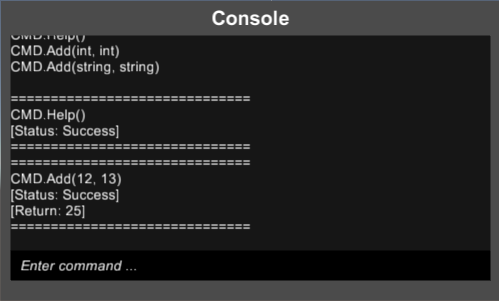
实现
通过Lexer.Analysis得到词语列表:
1
List<Token> tokens = Lexer.Analysis(cmd);
接下来,将词语列表传入语法分析器中,将得到三个输出数据:
- 完整的类型名称
- 函数名称
- 参数列表,支持 Int、Float、String、Bool 这四种参数类型
1
2
3
4
Parse(List<Token> tokens, out string str_namespace, out string str_func, out List<object> args)
// I.Am.Namespace.AnyType
// AnyFunction
// object[] {1, "i'm a string", 18.8, false}
得到以上数据,我们就可以通过C#的反射机制,来进行运行时静态函数的调用:
1
2
3
4
5
Assembly asb = Assembly.GetExecutingAssembly();
// 得到类型
Type tp = asb.GetType(str_namespace, true);
// 调用该类型的函数
object returnValue = tp.InvokeMember(str_func, BindingFlags.Static | BindingFlags.Public | BindingFlags.InvokeMethod, null, null, arg_list.ToArray());
附录
下载该 Unity package
This post is licensed under CC BY 4.0 by the author.